

Go to Mac platform Display platforms icon
Go to Mac platform Go to Windows platform Go to Android platform Go to iOS platform
UTM icon

UTM

5.0.8
Open source
5 2 reviews
3.5 k downloads
security security

Versatile virtualization for macOS

Advertisement
Remove ads and more with Turbo
Advertisement
Remove ads and more with Turbo
Merche Contreras icon
Reviewed by
Merche Contreras
Content Editor
Merche Contreras is part of Uptodown's in-house Editorial Team. Translated by Uptodown Localization Team

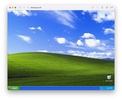
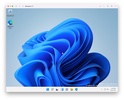
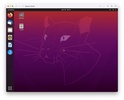
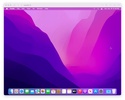
UTM is an app that allows you to run entire operating systems like Windows or Linux, and even older variants or different architectures, on your Mac, combining advanced emulation and virtualization when the hardware allows it. If you want to use another system on your device and are looking for a simple yet powerful option, this choice is secure, reliable, and convenient.

Flexible architecture: native virtualization or universal emulation

UTM takes advantage of the QEMU project's backend for extensive compatibility: more than 30 CPU architectures (x86_64, ARM64, RISC-V, PPC, MIPS, etc.) are supported, which means you can run everything from current to old operating systems, of different types, all from the same interface. On modern Macs with an Apple Silicon chip, UTM uses Apple's native virtualization framework, achieving speeds close to native when virtualizing systems compatible with ARM64. If you need to run a system with a different architecture, UTM emulates instead (with QEMU + JIT / TCG), which allows you to run almost anything, albeit at the cost of performance.

Advertisement
Remove ads and more with Turbo

Native interface and simple installation

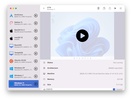
Unlike other highly technical virtualization environments, UTM was specifically designed for macOS, with a modern, straightforward, and user-friendly graphical interface. Installing it is as simple as downloading the .dmg file and following the installation process until it's complete. Once opened, you can create and save your own virtualizations to work with them any time you like. You don't need to worry if you haven't used a tool like this before, as UTM will guide you through the process step by step.

Vast support for operating systems and hardware

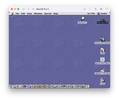
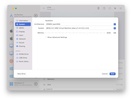
With UTM, you can run practically any system, such as modern Linux distributions, Windows, older versions of operating systems, and even macOS as a guest. The latter option can be done on Macs with Apple Silicon by booting ARM virtual machines, which is very useful for testing, development, or isolated environments. In addition to this, it has useful functionalities such as USB support, network, shared directories between host and virtual machine, state snapshots, and custom drives.

If you're looking for a good virtualization tool, download UTM for free, and this powerful tool will allow you to work with almost any operating system.

UTM is for you if

✓ You need to run diverse operating systems and architectures on your Mac for testing
✓ You prioritize a macOS-native interface with simple installation and step-by-step virtualization setup
✓ You value near-native performance plus USB, networking, shared folders, and snapshots for robust virtual environments

Information about UTM 5.0.8

Basic information

Developer osy
Category Business
Rating All ages
Languages English

Distribution model

Pricing Free
License Apache 2.0
Source code
Copyright © 2026 osy
Why is this app published on Uptodown? (More information)

Security and privacy

Required permissions Not applicable
See security and antivirus report

Download info

Downloads 3,532
Date Oct 17, 2026
File type DMG
Size 290.21 MB
SHA256 7b2d7b2e2a02b3de1757ef19a8f36573e6d9cceae8c8cca0abcbcaa4a852019a
Advertisement
Remove ads and more with Turbo

Older versions

dmg 5.0.7 Oct 16, 2026
dmg 4.7.5 Jan 3, 2026
dmg 4.7.4 Nov 27, 2025

Rate this App

Review the app
UTM icon

Rating

5.0
5
4
3
2
1
2 reviews

Comments

glamorousgoldenlychee90640 icon
glamorousgoldenlychee90640
5 months ago

thanks

Like
Reply
Advertisement
Remove ads and more with Turbo
Microsoft Teams icon
Collaborate with your team on Mac
Slack icon
Manage multiple teams and projects on your Mac
VirtualBox icon
Use Windows or Linux on Mac
Navicat Premium icon
A robust, all-in-one solution for database development
Basecamp icon
Manage projects remotely with your entire team
Notion icon
Manage multiple processes from a single place
Foxit PDF Reader icon
A PDF reader in innovative features
Beyond Compare icon
Compare and sync directories from two different computers
balenaEtcher icon
Create self-booting external disks on Mac
OpenCore Legacy Patcher icon
Install recent versions of macOS on your old Mac
Brave Browser icon
A user-friendly and secure ad-free browser based on Chromium
Citra icon
The best Nintendo 3DS emulator for Mac
OpenVPN icon
Get a secure connection with a VPN
OpenIDEA icon
Develop, debug, and manage your projects from a single environment
Disc Image Studio icon
Transform images into visual patterns for CDs, DVDs, and Blu-rays
SolidCraft icon
Design 3D parts for your projects
Claude icon
Anthropic's AI assistant for macOS
ChatGPT icon
The official app of OpenAI's popular chatbot for Mac
Microsoft Teams icon
Collaborate with your team on Mac
1.1.1.1 + WARP icon
Securely shield your Internet connection
Anki icon
Learn dozens of languages with the Anki method
Android SDK Platform-Tools (ADB) icon
Android app development kit
Visual Studio Code icon
A multiplatform code editor from Microsoft
Docker icon
Test and run lightweight Docker containers on Mac